Project Solara starts with a simple frustration: if AI is supposed to help all day, why does it still hide behind apps, tabs, and login screens? Microsoft’s answer is a pair of concept devices that bring AI closer to the moment you need it.
That idea sounds small at first. Yet if you’ve ever stopped mid-task to grab your phone, unlock it, and hunt for the right tool, the appeal becomes clear. Microsoft’s early vision is less about flashy hardware and more about removing that pause.
What Project Solara is trying to change
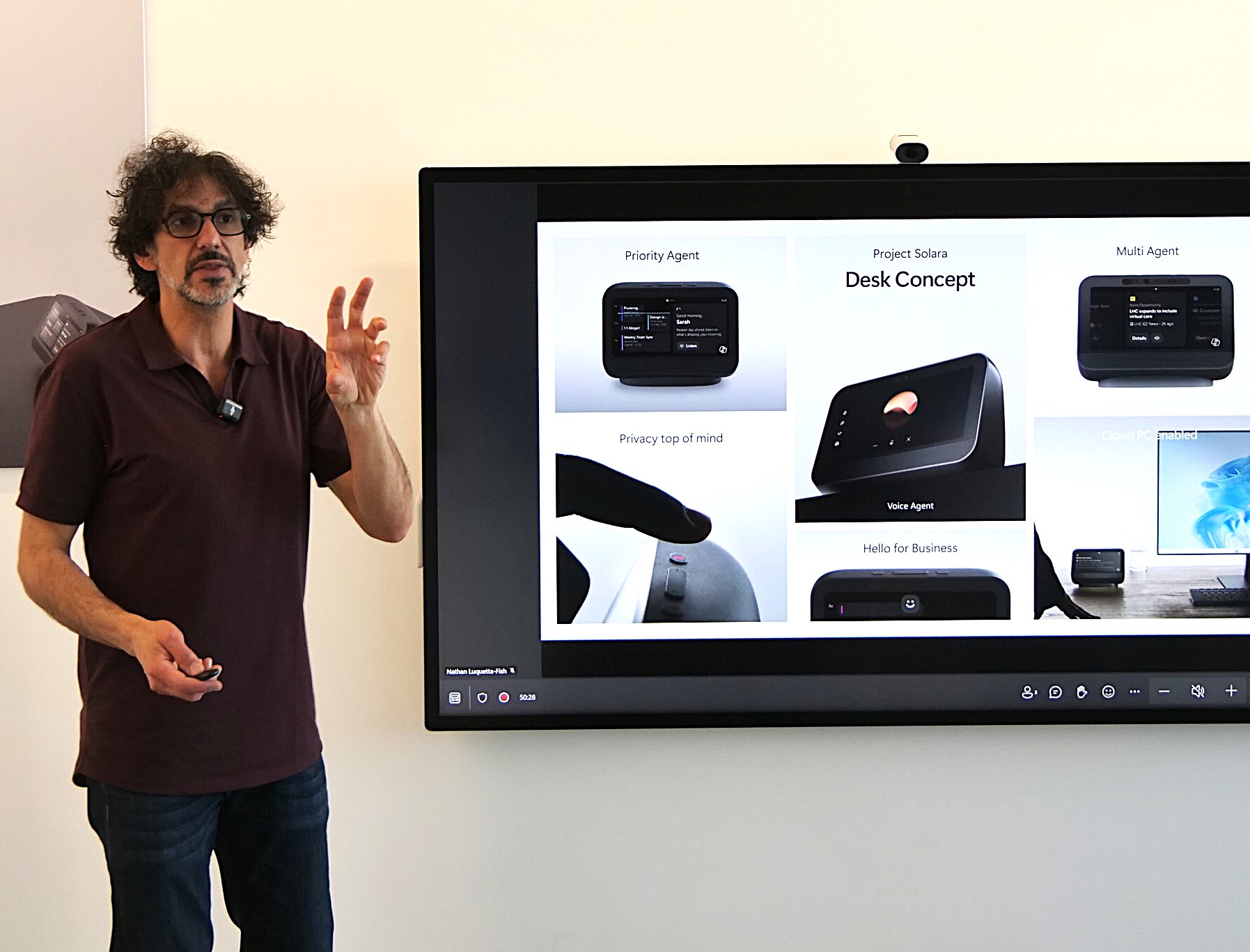
During an early visit to Redmond, Kevin Stratvert got a look at two Microsoft concepts under the Project Solara name. One is a wearable badge you can carry throughout the day. The other is a desktop companion that stays on your desk and keeps AI close at hand.
The pitch is direct. Instead of opening apps on a phone or computer, Microsoft wants AI help to live on dedicated devices that are ready in the right place at the right time. That could mean a badge clipped to your shirt during a shift, or a small screen near your monitor while you work.
Microsoft’s own Project Solara overview on Command Line describes the effort as a move toward “agent-first devices.” In plain terms, the company is testing hardware built around AI help first, not software menus first.
The core idea is speed. Microsoft wants AI to show up in the flow of work, not after you unlock a phone, open an app, and break your focus.
That matters because AI often feels most useful in short bursts. You want to capture a detail, ask a question, review a task, or log information. Those moments don’t always happen while you’re sitting in front of a laptop. They happen in hallways, at counters, on factory floors, and between meetings.
So while the badge and desk unit draw the eye, the larger change is about access. Microsoft is asking whether AI should stay inside the devices you already use, or whether some kinds of work call for tools built around AI from the start.
The AI badge is built for work that happens on the move
The first Project Solara concept looks a lot like an employee badge. That design choice feels deliberate. Microsoft isn’t trying to make a tiny phone you wear around your neck. It is testing a work tool that blends into jobs where people are already moving, scanning, checking, and recording information.
The badge includes a touchscreen, a camera, microphones, a speaker, and a fingerprint reader. Those parts tell you almost everything about its intended role. It can see, hear, speak, and confirm the right user before sharing sensitive information.
Microsoft’s example makes the use case easy to picture. A nurse walking between patient rooms might need to capture a blood pressure reading. Instead of writing the number down, finding a workstation later, and typing it in, the nurse could point the badge’s camera at the reading. The AI could understand what it sees and help document it on the spot.
That same pattern could fit many jobs that happen away from a desk. Retail staff might need quick product or inventory information. Field workers could capture details while standing at a job site. Healthcare staff could ask short questions or record a conversation while staying focused on the person in front of them.
The badge is also meant for quick interactions, not long sessions. You could ask a question, capture information with the camera, record speech, or pull up details while you’re in motion. That makes the device feel less like a pocket computer and more like a notebook that can listen and answer back.
The shape may sound unusual at first. Still, PCWorld’s report on the AI badge concept captures why it stands out: Microsoft is pitching a form factor that trades broad flexibility for instant access in specific work settings.
Why Microsoft thinks a dedicated device can beat a phone
The obvious question comes fast: why carry a badge when almost everyone already has a phone? Microsoft has a practical answer. A phone can do many of the same things, but it asks for several small steps first. You pull it out, unlock it, open the right app, then start the task.
Those steps sound minor. Over a full workday, they add friction. They also interrupt attention at the exact moment you were trying to capture something quickly.
A dedicated device changes that rhythm. Because it has one clear purpose, the AI is always close and always ready. That matters most in jobs where people work with their hands, move between locations, or need information in short bursts. In those settings, the best tool is often the one that asks the least from you.
Healthcare adds another layer to the argument. A personal phone is a poor place to handle patient information. Microsoft raised that concern directly. A work-issued badge with its own security features, including fingerprint sign-in, makes more sense when the task involves protected data.
There is also a psychological shift here. Phones mix personal life and work all day long. A dedicated badge does not. It tells the user, and the workplace around them, that this device exists for one lane of activity. That focus may end up mattering as much as the hardware itself.
The desktop companion keeps AI one glance away
The second Project Solara concept moves in the opposite direction. Instead of following you through the day, it stays planted on your desk. The goal is similar, though. Microsoft wants AI close enough that you can use it without turning your whole computer into an obstacle course of apps and windows.
This desktop device includes a touchscreen, microphones, speakers, and facial recognition for secure sign-in. Microsoft says it can help you review your schedule, keep track of important tasks, access Microsoft 365 Copilot, and get quick answers without constant tab switching on your PC.
Here is the clearest way to compare the two concepts:
| Device | Main setting | Key hardware | Typical use | | | | | | | Wearable badge | On the move | Touchscreen, camera, microphones, speaker, fingerprint reader | Capture information, ask quick questions, record details during active work | | Desktop companion | At a desk | Touchscreen, microphones, speakers, facial recognition | Review schedule, manage tasks, use Copilot, get answers without leaving your workspace |
The split is easy to see. One device is for motion, while the other is for focus at a desk.
The desk unit becomes more interesting when Microsoft explains how it can work beside a normal computer. The company says it can connect to Windows 365. If you hook it up to a monitor, it can run Windows through the cloud. That means the device is not only an AI sidekick. In some setups, it could also act as a cloud-backed computing endpoint.
That detail matters because Microsoft is not describing a future where PCs disappear. The desktop companion is meant to live alongside traditional computing, not replace it overnight. You still have your main monitor, keyboard, apps, and files. The difference is that AI gets its own dedicated surface instead of becoming one more panel squeezed into your workday.
For some people, that may sound like one device too many. For others, it could feel like relief. Anyone who spends the day hopping between chat tools, calendar windows, browser tabs, and office apps knows how easy it is to lose a thread. A separate place for quick AI help may reduce that mental clutter.
Project Solara matters because Microsoft wants a platform, not only products
The most interesting part of Project Solara may be the layer beneath the hardware. Microsoft has already been testing these devices internally with employees, and one piece of feedback stood out: some people liked having AI on a dedicated device instead of opening another app or browser tab every time they wanted help.
That comment gets to the heart of the project. The question is not only whether a badge or a desk companion looks useful. The bigger question is whether AI works better when it has a place of its own.
Microsoft appears to think the answer could be yes. The company sees AI agents playing a larger role in how people use technology, and Solara is part of that bet. Rather than treating these as two isolated gadgets, Microsoft is building a platform that hardware makers and developers could build on top of, much the way Windows grew into a foundation for many kinds of PCs and software.
GeekWire’s inside look at Project Solara adds context to that platform strategy. The important point for everyday users is simpler: Microsoft is thinking beyond a single launch device and toward a wider category of AI-first hardware.
That does not mean these products are ready for store shelves. Microsoft presented them as concepts, and you cannot buy them today. The company is still testing the shape of the idea, the hardware choices, and the right places for AI outside the phone and PC.
Even so, the direction is clear. Microsoft believes the next wave of AI may show up in purpose-built tools that fit into specific moments of work. Some may sit on desks. Others may hang from a lanyard or clip to a uniform. If Solara goes anywhere, the big shift will not be that AI exists. The shift will be where it lives.
Final thoughts
Project Solara raises a useful question about AI: should it stay trapped inside software, or should it move closer to the task itself? Microsoft’s two concepts suggest the company wants both options, with a wearable device for work on the move and a desk companion for people who want AI within sight all day.
The hardware is still early, and the final products may look different. Yet the central idea is already clear. Microsoft thinks many people would rather reach for a dedicated tool than stop what they are doing to open another app.