Some routers promise speed and then fold the moment you step into the hallway. The ASUS GT-BE19000AI does not read like that kind of product.
ASUS positions it as the world’s first AI router, and the hardware backs up that big claim with Wi-Fi 7, dual 10GbE, and a long list of software controls. The bigger question is whether all that power matters in real use.
After speed tests, range checks, and a walk through its settings, one thing stands out: this router is built for people who want serious headroom, not a basic plug-it-in-and-forget-it box.
A large, unmistakably ROG router
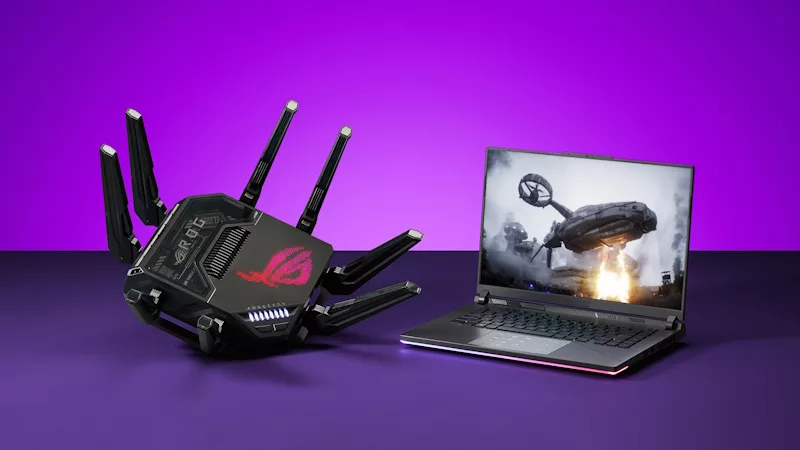
The GT-BE19000AI looks every bit like a Republic of Gamers product. It is large, angular, and hard to ignore. Eight antennas ring the body, and each one tilts and swivels so you can adjust placement for your space.
Out of the box, ASUS includes the usual paperwork, some stickers, a braided Ethernet cable, and a 60W power supply that supports 100 to 240V input. A 3-year warranty also comes with it, which is a nice point in a market where support terms can feel thin.
The design is not only about style. Across the top, there is a visible heat sink under the ROG branding, plus status LEDs and hardware buttons for WPS and lighting control. Around the bottom, ASUS adds a wide set of vents and lifts the body slightly off the surface. That helps airflow, which matters on a router meant to push multi-gig wired traffic and fast Wi-Fi 7 at the same time.
Lighting is part of the pitch too. The ROG logo supports Aura RGB, and the router gives you several patterns and color options. Some modes may appear to flicker on camera, but the lighting looked stable to the eye during the demo. If RGB feels like extra noise on a networking device, you can switch it off.
ASUS also markets this as a flagship 19Gbps tri-band Wi-Fi 7 router, and the FlashRouters GT-BE19000AI product page echoes the same focus on high-end wireless and multi-gig networking.
The ports make it clear who this router is for
Turn the router around and the intent becomes even clearer. This is not a model built around one fast WAN port and a few ordinary LAN ports. It is built for homes with multi-gig internet, fast switches, network storage, and users who care about moving large files as much as loading web pages.
The rear layout includes power, a physical power switch, USB 2.0, and USB 3.0. That USB 3.0 port is more useful than it first looks. You can attach external storage and share it on the network, which gives the router basic NAS-like duties. The same USB system can also support a compatible 4G or 5G phone as a backup internet source through USB tethering.
For wired networking, the router offers dual 10GbE plus multiple 2.5GbE ports. One 10GbE port can act as the WAN connection, and a 2.5GbE port can also fill that role if needed. In the test setup, the 10GbE WAN port was used because the internet connection was 5Gbps up and down. The second 10GbE port connected to a 10Gb switch, which let the router sit in the middle of a properly fast local network instead of bottlenecking it.
That setup matters because Ethernet hit the full 5Gbps internet speed without any trouble. In other words, the wired side of this router is not the limiting factor. If you already pay for multi-gig service, the GT-BE19000AI has the ports to make use of it.
Speed tests show where this router earns its price
Fast router reviews can get muddy because an internet speed test measures more than the router. Your ISP, the remote test server, and even time of day all play a part. That is why the local speed test in this review matters so much.
The internet tests were strong from the start. Wired devices hit the full 5Gbps service ceiling. Over Wi-Fi, the tested device reached about 3.4Gbps down and nearly 1.9Gbps up. Those are big numbers, but they still do not tell the whole story.
A local speed test removes the ISP and the public server from the equation. The computer becomes the server, so traffic flows from Wi-Fi device to router to local machine. That isolates the router much better, and the upload result jumped hard in that setup.
Here is the performance snapshot from the testing:
| Test | Download | Upload | Notes | | | | | | | Wired internet test | 5 Gbps | 5 Gbps | Full ISP speed over Ethernet | | Wi-Fi internet test | 3.4 Gbps | 1.9 Gbps | Limited by internet path | | Local Wi-Fi test | 3.6 Gbps | 4.15 Gbps | Better look at router headroom | | Range test at 20 ft | about 3.4 Gbps | about 3.0 Gbps | Minor drop from close range | | Range test at 50 ft | about 2.2 Gbps | about 1.3 Gbps | Outside the home | | Range test at 100 ft | over 1 Gbps | not stated | Across the street |
The headline is simple: the router had more in reserve than the internet test alone suggested. That makes sense, because public speed servers are not always built to reflect the upper edge of a local Wi-Fi 7 network.
Range was strong too. At 20 feet, the download speed stayed near 3.4Gbps. At 50 feet, with more separation and likely more interference, download still sat around 2.2Gbps. Even at 100 feet, across the street, the router still pushed over 1Gbps download. That is a serious result for wireless.
Client devices still matter. Two of the tested Wi-Fi 7 phones were faster than the other two, and the difference came from the phones, not the router. That tracks with the broader conversation around this model. TweakTown’s GT-BE19000AI review also pointed to strong 5GHz, 6GHz, and MLO performance.
The software is packed, and most of it is included
ASUS gives you two ways in: the mobile app or the browser interface at asusrouter.com, from a computer connected to the router. Both work, but the browser view is where the deeper controls live.
The dashboard alone says a lot about this router’s audience. You can see WAN status, port activity, attached USB devices, and other network details at a glance. During the walkthrough, the router showed a 10Gb internet connection, a second 10Gb link to a switch, and a USB drive attached for storage tests.
That level of visibility carries through the rest of the software. AI Mesh support is here, so the GT-BE19000AI can join a larger ASUS mesh setup. It can also run in access point mode if routing duties live elsewhere. More importantly, ASUS includes a lot of features in the base price that some brands treat like add-ons.
Custom networks go far beyond a guest SSID
This router can host far more than one main Wi-Fi name and a throwaway guest network. In the review setup, there was a dedicated Wi-Fi 7 network, a normal everyday network, and a guest network. Beyond that, ASUS lets you create gaming, kids, IoT, and VPN-focused networks.
The gaming SSID gets the highest priority. That means you can reserve the best treatment for the devices that need it most, whether those are gaming PCs, consoles, or anything else you want to favor. Meanwhile, the kids network can follow a schedule, so Wi-Fi access for those devices can shut off at a set time.
Guest access deserves a closer look because ASUS exposes a useful but risky option.
If you set a guest network to use the same subnet as the main network, guest devices can see shared resources on that network, such as printers, NAS devices, and other computers.
That may be perfect in one house and a bad idea in another. The point is not that ASUS hides the control. It is that ASUS gives you the control in the first place.
Gaming, security, and AI tools have real uses
The “AI” label here feels less like magic and more like a stack of smart controls. Adaptive QoS includes an AI Balance mode, which spreads network resources across gaming, streaming, and daily use. If gaming is the priority, you can switch to a gaming-focused mode instead.
Security features are built in as well. AI Protection adds extra safeguards, and parental controls let you filter content and manage family devices with more detail than a lot of stock router software. Traffic analysis tools are present too, although those are only useful if you enjoy looking under the hood.
The deeper menus keep going. AI Game Boost is part of the gaming toolkit, and there are more settings for gaming traffic priority beyond the main QoS toggle. Some related ASUS services may depend on separate apps or plans, but the router already comes with a lot before you reach that point.
For tinkerers, the GT-BE19000AI opens still more doors. The walkthrough mentioned Docker support and Home Assistant setup, which pushes this router closer to a small network platform than a simple home gateway.
AFC may be the feature that matters most
The flashiest part of this router is the AI branding. The most useful part may be AFC, short for Automated Frequency Coordination.
AFC matters because 6GHz is where Wi-Fi 7 can really stretch out, but 6GHz range often trails 5GHz and 2.4GHz. On this router, AFC can boost 6GHz transmit power where local rules allow it. In the test location, AFC was available, and the review called out a real improvement in reach.
AFC is location-dependent. The router checks whether it is allowed in your area before enabling the extra 6GHz power.
That feature helps explain why 6GHz held up so well at distance. It does not make walls disappear, and range will still depend on your home, your materials, and the noise around you. Still, when a router can keep fast download speeds alive at 50 feet and over 1Gbps across the street, something is going right.
ASUS also gives you band-level control beyond the automatic tuning. In the professional settings, each band has its own options, including transmit power adjustment. So if you want full strength, you can run it that way. If you prefer lower power use, eco-style tuning is there too.
For power users, that matters. Many routers talk about speed but keep the radio controls hidden. This one lets you change them.
USB storage and backup internet make the router more useful day to day
The USB 3.0 port is not an afterthought. In the demo, an older Lexar flash drive was plugged into the router and shared across the network. Even with that aging drive, the transfer speed looked healthy.
A 2.82GB video file moved to the network drive in under a minute, and playback from the shared folder started promptly. That is not a replacement for a dedicated NAS with fast disks and RAID, but it is more than enough for casual file sharing, quick backups, and media access around the house.
The setup also showed how flexible ASUS is with protocols and permissions. On Mac, the shared drive was accessed through Samba. For Windows in this setup, FTP needed to be enabled. Permissions could be opened up for easier access or locked down so users have to enter credentials.
That same USB system supports a second practical use: backup internet. If you have a compatible phone and plan that allow USB tethering, the router can use that connection as a failover source. When your main ISP goes down, that can keep the house online without swapping cables or building a second network by hand.
This is where the GT-BE19000AI starts to feel less like a flashy gaming router and more like a small network appliance. It pushes fast Wi-Fi, but it also handles storage sharing, failover options, mesh integration, and access point mode without making a mess of the interface.
Who this router fits, and who may not need it
The GT-BE19000AI is easy to admire and harder to place because it has more power than many homes need. If your internet plan is 5Gbps, your devices are modern, and your local network includes fast switches or wired workstations, this router makes immediate sense.
It also fits homes with lots of devices and heavy traffic. Gaming, streaming, large downloads, wireless file transfers, smart home gear, and family devices all compete for airtime. A router like this has room for that kind of load. That view shows up outside this test too. In a hardware subreddit discussion of the GT-BE19000AI, users described it as strongest in dense, high-demand setups rather than as a simple “gaming” badge product.
On the other hand, many buyers will never touch its ceiling. If your plan is 200Mbps or 400Mbps and your network is mostly phones, TVs, and a laptop or two, this router could be overkill. ASUS makes cheaper models that still offer a good share of the company’s software perks.
That does not mean slower internet makes this router pointless. Strong range, AFC on 6GHz, flexible SSIDs, and deep controls still have value. It only means the GT-BE19000AI is built as a performance-first router, and its best qualities show up most clearly when your network can ask more of it.
Final thoughts
The ASUS GT-BE19000AI feels like a router built for people who are tired of compromises. It posted fast Wi-Fi 7 numbers, held range better than expected, and backed it all up with deep software control.
The “AI” part is not a magic trick. What matters more is the mix of headroom, multi-gig ports, AFC support, and features that are included instead of sliced into extras.
If your network already runs hot, this router has the space to breathe.